# Build vs tests: why "it passes" doesn't mean "it works"

<p class="meta-line">Mik Bry · 2026-08-25 · ~7 min read · Launch Readiness · Testing</p>

<div class="article-hero">

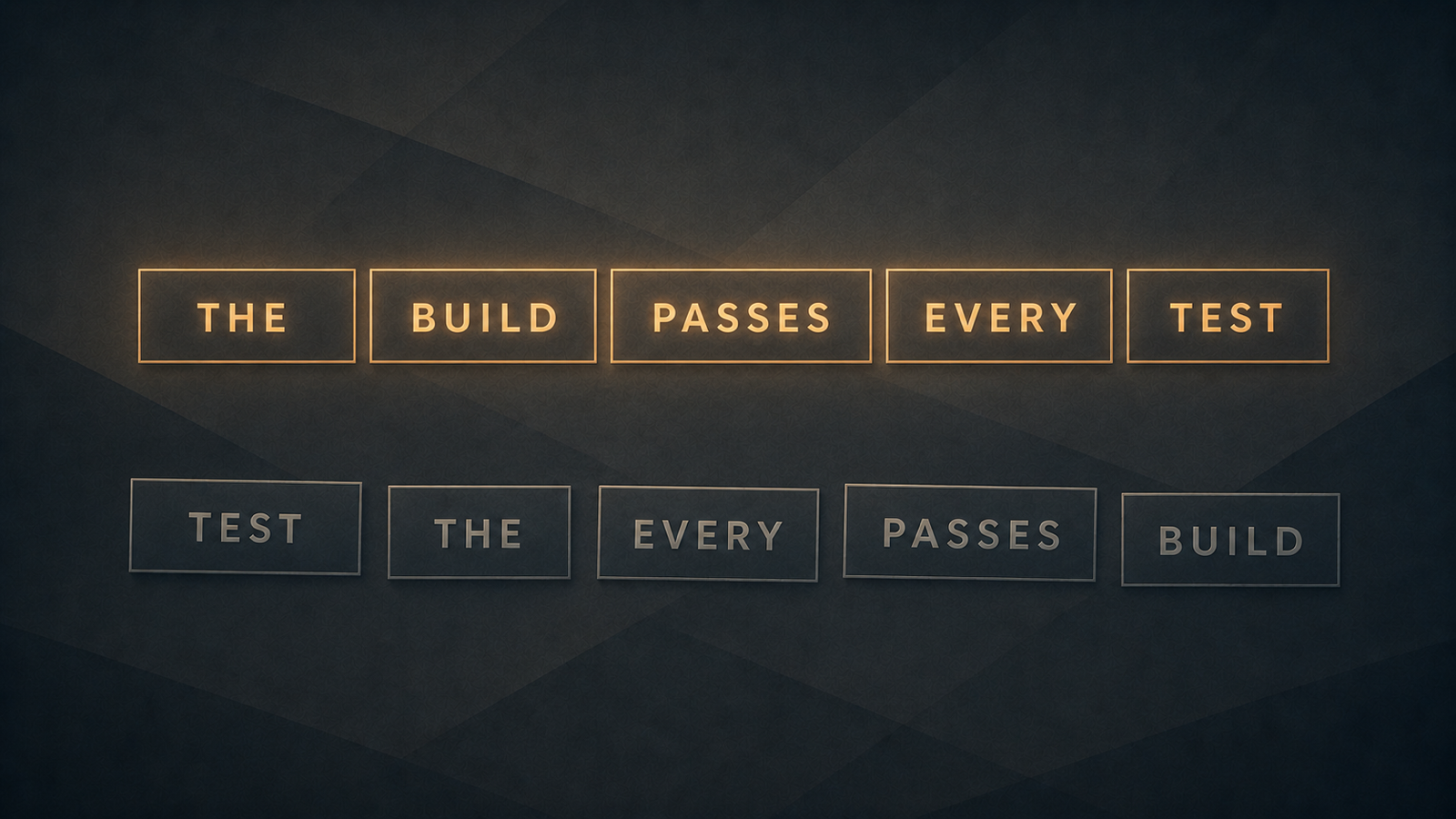
![A grammatically perfect sentence floats above the same words shuffled into nonsense order.](/assets/2026-08-25-kb-build-vs-tests-hero.png)

</div>

Your app builds. Your AI agent says it's done. Isn't that the same as working?

Not quite. That gap is where problems in AI-built apps can stay invisible for surprisingly long. A build passing tells you something real — just not the thing most people assume it tells you.

This article is about that gap: what a build actually checks, what a test actually checks, and why the difference matters more once your agent is the one telling you "it passes."

<div class="article-toc">
<div class="article-toc-label">What this article covers</div>

1. [What "build" and "tests" actually mean](#s1)
2. [Why a green build doesn't prove the product works](#s2)
3. [What good test coverage looks like](#s3)
4. [What you can safely ask your AI agent](#s4)

</div>

<h2 id="s1"><span class="section-no">01 —</span> What "build" and "tests" actually mean</h2>

A "build" is the step that turns your source code into something that can actually run. Depending on how the project is set up, that step might check that the code compiles, that the types line up, that the formatting rules pass, that images and other assets get generated correctly — and sometimes, depending on configuration, it runs a batch of tests too. What exactly counts as "the build" is a project-by-project decision, not a fixed universal list.

"Tests" are a different kind of check. They don't ask whether the code is put together correctly — they ask whether the *behaviour* is correct. Does the sign-in screen actually let the right person in and keep the wrong person out? Does the payment get recorded when the card is charged? Does one customer's data actually stay invisible to another customer?

Here's the clearest way to picture the difference: *"Like writing English with no grammatical errors, so the words are correct on their own — but read together they make no sense."* A build is the grammar check — every word spelled correctly, every sentence structurally sound. Tests are the meaning check — does the paragraph actually say what you meant it to say.

**Build** answers: can this software be assembled at all? **Tests** answer: does the behaviour we actually care about still work? Both checks are useful. Neither one substitutes for the other.

<h2 id="s2"><span class="section-no">02 —</span> Why a green build doesn't prove the product works</h2>

"The build passed" is a narrower claim than it sounds. It means the checks included in that particular build configuration passed — nothing more. A green build does not prove sign-in works. It does not prove a payment is recorded correctly. It does not prove one customer can't see another customer's data. It proves that whatever was checked, checked out. If nothing checked the payment flow, the build has nothing to say about the payment flow — green or not.

The grammar analogy holds here too: a sentence with flawless spelling and grammar can still say something completely wrong, or nothing at all. The build is graded on grammar. Nobody graded it on meaning.

This gets sharper once an AI agent is the one writing and shipping the code. A conversational success message — human or AI — is not evidence. With AI, the volume and confidence of those messages can make that distinction especially easy to forget: "build passed," "done," "should be working now," delivered in the same reassuring tone whether or not anyone actually checked the thing that matters to your business. Your only signal of trouble becomes silence: no error, no warning, nothing wrong that anyone can see — until a paying customer hits a checkout button that quietly doesn't record the charge.

<p class="refs"><strong>References:</strong> Martin Fowler's <a href="https://martinfowler.com/bliki/TestPyramid.html">TestPyramid</a> distinguishes an *automated build* — one that at least compiles and packages the software automatically — from a *self-testing build*, one whose automated tests give you real confidence the software behaves correctly. Kent C. Dodds' related principle, cited by <a href="https://web.dev/articles/ta-strategies">web.dev</a>, is worth carrying into any conversation with your AI agent about testing: "The more your tests resemble the way your software is used, the more confidence they can give you."</p>

<h2 id="s3"><span class="section-no">03 —</span> What good test coverage looks like</h2>

You don't need comprehensive test coverage before you launch. You need coverage on the handful of things that would actually hurt you if they silently broke. For most founder-built apps, that's four flows:

- **Sign-in** — the right person gets in, the wrong person doesn't.
- **Payments** — a charge is recorded correctly, and a failed or declined payment doesn't quietly grant access anyway.
- **Data changes** — the change that happens in production is the one you meant, and it doesn't leak into another customer's account.
- **Account recovery** — a locked-out user can get back in through a path that an attacker can't walk through just as easily.

If meaningful tests exist for those flows, you have a much better starting point, even if the rest of the app has thin coverage. If none exist for those four, the build passing tells you very little about whether the app is safe to put in front of paying customers.

Tests are also only worth as much as how often they actually run. A test suite that exists but only gets run by hand, occasionally, when someone remembers, protects you far less than one that reruns automatically every time the code changes — the job usually called continuous integration. Tests are the questions; the automatic rerun is what makes sure the questions get asked every single time, not just the first time.

<aside class="lr-callout">
  <div class="lr-callout-icon" aria-hidden="true"></div>
  <div class="lr-callout-body">
    <p class="lr-callout-eyebrow">Automated first read</p>
    <p class="lr-callout-text">Before requesting a CTO review, you can start with the <a href="https://mikbry.com/launch-readiness/">Launch Readiness Scan</a>. It gives you an automated first read, but it doesn't see your production environment or business context.</p>
  </div>
</aside>

<h2 id="s4"><span class="section-no">04 —</span> What you can safely ask your AI agent</h2>

You don't need to write tests yourself, and you don't need to ask your agent to write them right now either. The first useful move is just finding out what already exists — and being precise about what "I found nothing" actually means. If your agent doesn't find a test for something, that means the search came up empty, not that the test is guaranteed not to exist somewhere it didn't look. Ask it to be honest about that distinction.

<div class="check-callout">
<div class="check-callout-label">A safe prompt to paste into your AI coding tool</div>

> "List the tests covering sign-in, payments, data changes, and account recovery. For each flow, tell me if you found no tests — don't assume none exist elsewhere. Point me to the test files. Don't write tests yet."

The prompt is deliberately read-only: it asks the agent to inspect and report, not to modify the project.

</div>

A build passing is real information — it tells you the app can be assembled. It was never meant to tell you whether it works for the four flows above, and treating it that way is where the trouble starts.
